Alphamap: Award-Winning AI Tool for Trial Balance Mapping

Best Digital Innovation, Tolley's Taxation Awards 2024. Reduced processing time by 80%, achieving 90%+ mapping accuracy.

My role
UX/UI Designer
Team
Senior Business Analyst
Frontend Developer (1)
Backend Developer (2)
Product Manager
Time frame
3 weeks
Tools
Figma
Microsoft Teams
Jira Confluence
Overview
Tax professionals across the UK and Ireland were spending hours manually mapping trial balance data into profit and loss statements, a process that was repetitive, error-prone, and created significant compliance risk. Tax Systems became the first software provider in the UK and Ireland to solve this problem using generative AI. I owned the end-to-end UX design of Alphamap from discovery through to developer handoff, designing a review interface that made AI outputs transparent, trustworthy, and fast to act on. The product won Best Digital Innovation at the Tolley's Taxation Awards 2024.
The Results
1. Processing time reduced by 80%, freeing tax teams to focus on higher-value analytical work rather than data entry.
2. P&L and DPL statements populated with over 90% accuracy, significantly reducing human error and compliance risk.
3. Tax treatment analysis prepared to over 80% accuracy, giving teams a reliable starting point for review.
4. First solution of its kind launched in the UK and Ireland, establishing Tax Systems as an innovation leader in the sector.
5. Won Best Digital Innovation at the Tolley's Taxation Awards 2024, recognised as a category-defining product.
"This looks amazing!"
Joe Barrett, Senior Business Analyst - on first seeing the mapping interface designs
The Problem
Trial balance mapping was one of the most time-consuming and error-prone tasks in tax compliance.
Manual mapping at scale
Tax professionals manually categorised every line item in a trial balance file into P&L and DPL statements. With thousands of rows per file, this took hours per engagement.
No intelligent mapping
Every line item required a human decision with no system to learn from previous mappings or apply consistent logic across engagements.
No integration with existing workflow
Alphatax had no way to ingest trial balance data intelligently. Users had to leave the platform, process data manually, and re-enter it by hand.
Compliance risk at scale
Mapping errors directly affected the accuracy of tax submissions, creating significant risk for both the firm and their clients.
The Solution
Fully automated AI mapping
Upload a trial balance file and the AI maps every row to the correct P&L category, DPL category, and tax treatment automatically. No manual mapping required.
Review interface for AI outputs
The user's job is to review, not map. Confidence levels are immediately visible across every row. High confidence rows need no action. Low confidence rows need attention.
Tax treatment analysis
Alphamap generates an initial tax treatment analysis per line item, elevating users from data entry to tax analysis.
Seamless Alphatax integration
Designed to integrate directly into the existing Alphatax workflow. Raw data in, completed mapping out, without leaving the platform.
10,000 rows of trial balance data. Mapped automatically.
But would a tax professional trust it.. đŸ¤”?
context
Why this had to be designed carefully
Tax professionals are highly skilled, detail-oriented users working in a compliance-critical environment. They do not trust systems they do not understand. Designing for this audience meant every AI output needed to be transparent, explainable, and easy to override. A black-box approach would have failed immediately.The core design challenge was not making the AI work. It was making the AI trustworthy.
Constraints
Epic limitations
Domain complexity
Trial balance files can contain thousands of line items with categorisation rules that vary by organisation and jurisdiction. The interface had to handle this complexity without overwhelming the user.
Integration dependencies
Alphamap had to work within the technical constraints of the existing Alphatax platform. Every design decision was balanced against what was feasible within the existing architecture.
User trust
Tax professionals are trained to be sceptical of automated outputs. Every design decision had to reinforce confidence in the AI without overpromising accuracy.
AI accuracy expectations
Generative AI is not perfect. The interface had to be honest about confidence levels and make it easy for users to correct outputs without losing trust in the system overall.
Research
Understanding the domain
Formal user research with external tax professionals was not feasible within the project timeline. I worked closely with the Senior Business Analyst who had deep domain expertise in trial balance workflows and tax treatment categorisation. Through structured sessions we mapped the existing manual process, identified where errors occurred most frequently, and understood what a tax professional needed to see before trusting an AI output.This domain immersion directly shaped every design decision that followed.
Wireframes
Low fidelity
Wireframes were done in a workshop session with the Senior Business Analyst to run through the scope and requirements.
Design Decisions
Designing for trust
The key decisions that shaped the design of award winning Alphatax map
Confidence indicators
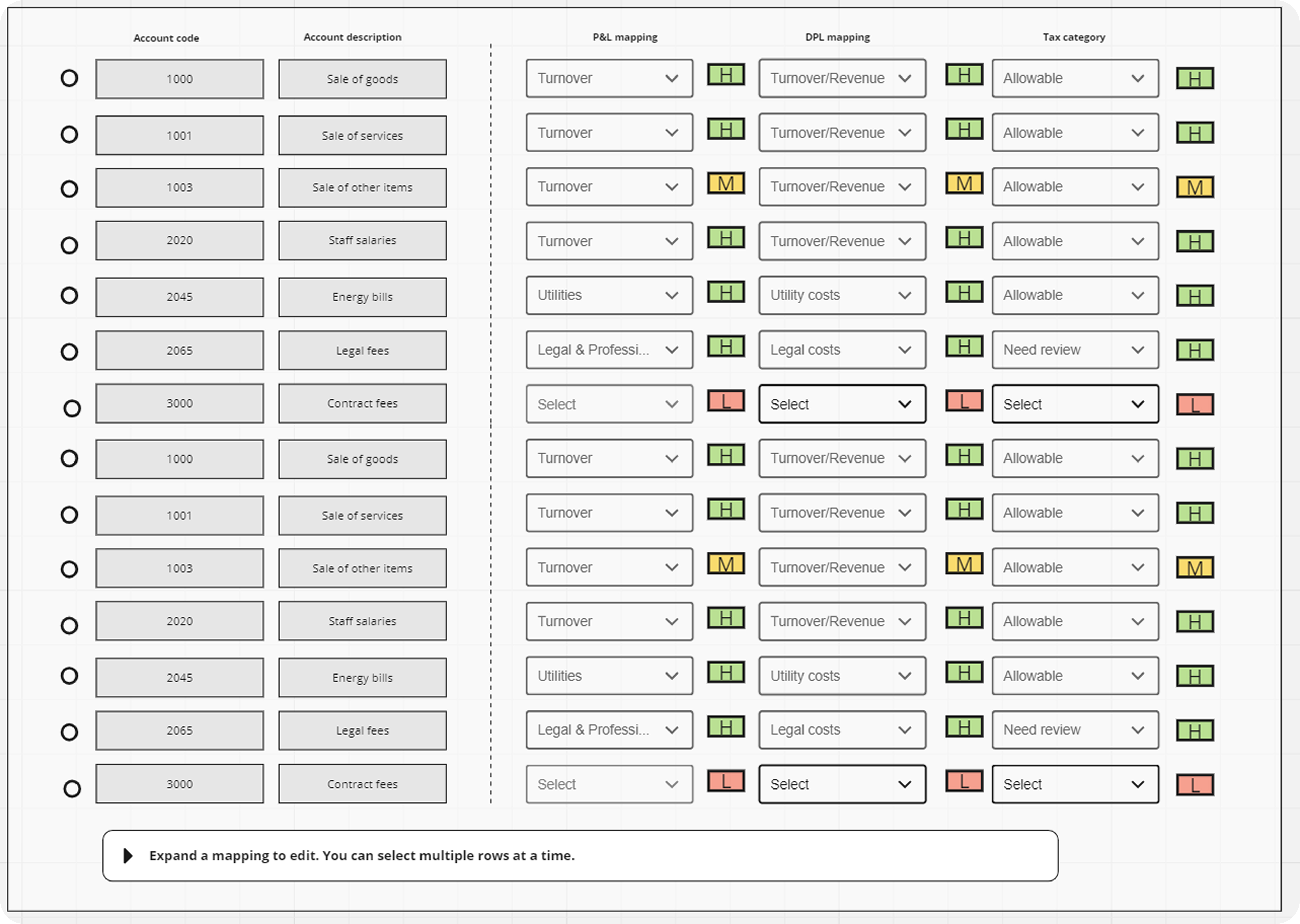
H, M, L The AI assigns a confidence level to every mapping across all three columns: P&L, DPL, and Tax Category independently.

I designed a simple H, M, L badge system using colour to make confidence immediately scannable across thousands of rows. Green for High, amber for Medium, red for Low. A tax professional can open the interface and know in seconds exactly where the AI is certain and where it needs attention.
Unconventional checkbox placement
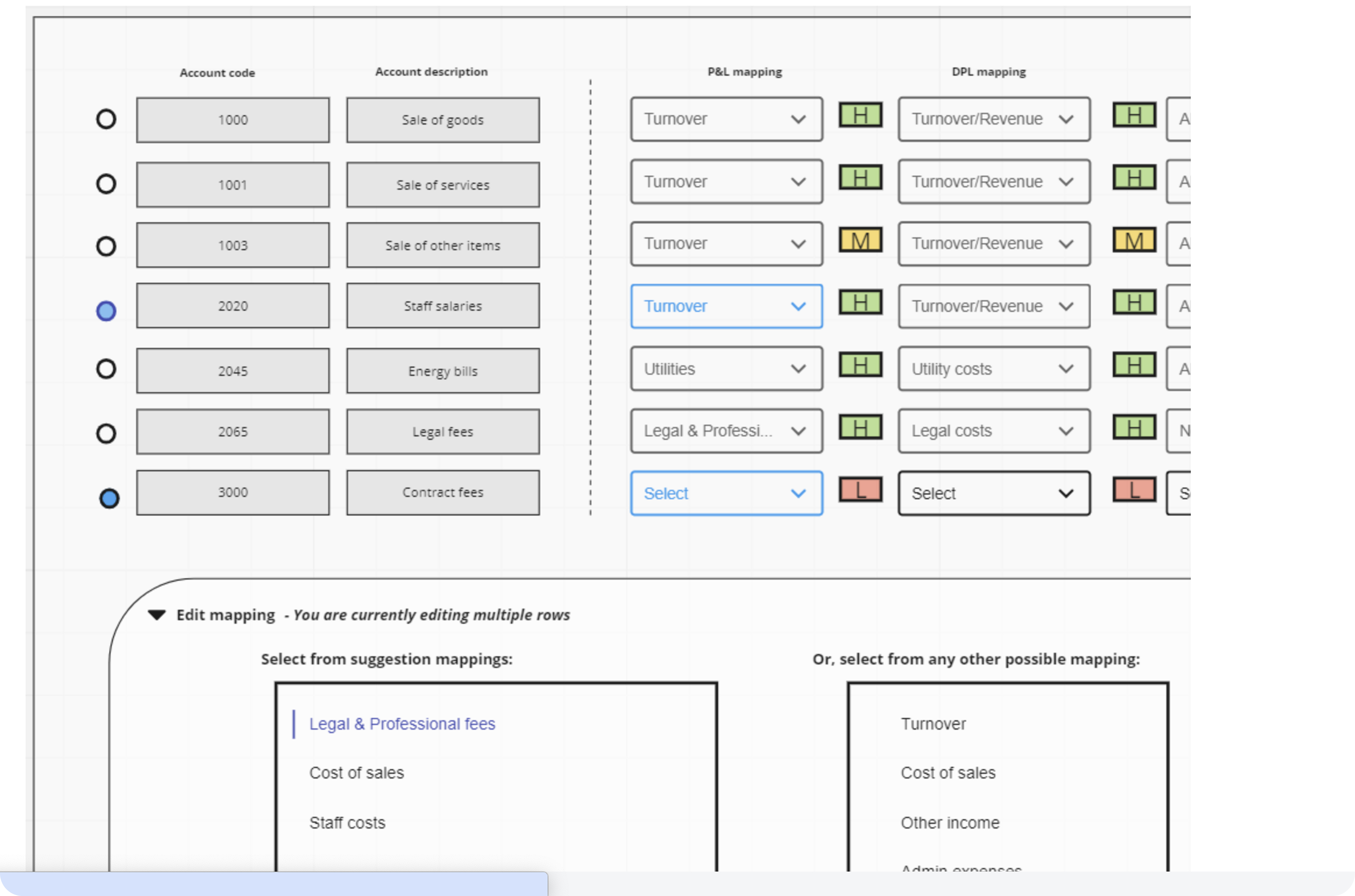
A standard table design places selection checkboxes on the far left of every row. I placed them in the middle, directly adjacent to the confidence badge and the mapping dropdown. The decision was deliberate. When a user is reviewing AI mappings and needs to select rows for bulk correction, they need to be certain they are acting on the right row. Placing the checkbox next to the confidence level meant the user could see both the AI certainty and their own action point in a single glance, eliminating any ambiguity about which row they were selecting.

More importantly, this placement enabled the core workflow. Users could visually scan for Low confidence badges, select multiple rows simultaneously using the adjacent checkboxes, open one dropdown, and apply a correction across all selected rows in a single action.
Batch review over line-by-line confirmation
Early concepts required users to review and confirm every mapping individually. This would have eliminated the time saving entirely a file with 10,000 rows would have required 10,000 interactions. I designed a batch review model where users filter by confidence level, select all Low confidence rows, and apply corrections in bulk. High confidence rows are approved implicitly. The user only touches what the AI was uncertain about.
A/B
Filter systems
The filtering system evolved significantly across the project.
Filter A
The  iteration collapsed all filters behind a single Filter button. Cleaner header, more breathing room in the interface, but less immediately discoverable for power users.
Why I went for this option, option B?
Whilst the first iteration was cleaner, it required two more clicks to get the job done. Open the filter panel is one click to remove filters you need to open the the filter is another click. From speaking with the Senior Business Analyst fitlers would be a very used feature and having it on quick display would not only save time but frustration.
Roll out
Epic planned in phases
The product launched in phases, beginning with the core trial balance to P&L mapping before expanding to DPL mapping and tax treatment analysis. This allowed the team to validate AI accuracy and gather feedback from real tax professionals before expanding the scope of automation.
hAND OFF
Handing off the designs for development
Design handoff was delivered through annotated Figma files covering all states, edge cases, and interaction patterns across the confidence system, bulk selection, filtering, and correction flows. I worked closely with frontend developers throughout implementation to ensure the confidence indicators and bulk selection behaviour were executed accurately.
Award winning
Best Digital Innovation at the Tolley's Taxation Awards 2024
Reflection
My thoughts on this project
Alphamap was the most technically complex product I have worked on. The core challenge was not designing screens, it was designing trust. Tax professionals needed to believe that an AI system could handle their data accurately before they would rely on it in a compliance context.

The most important lesson was that transparency beats confidence. An interface that honestly surfaces uncertainty and makes correction easy builds more trust than one that presents AI outputs as infallible. Showing H, M, L instead of hiding confidence levels was a risk it exposes the AI's limitations.

But it was the right call. Users trusted the system more because they could see where it was uncertain, not less.The unconventional checkbox placement is the decision I am most proud of. It was a small change that enabled the entire batch correction workflow and made the 80% time saving achievable in practice, not just in theory.Winning Best Digital Innovation at the Tolley's Taxation Awards 2024 validated not just the technology but the design approach. The AI worked because users trusted it enough to use it.